
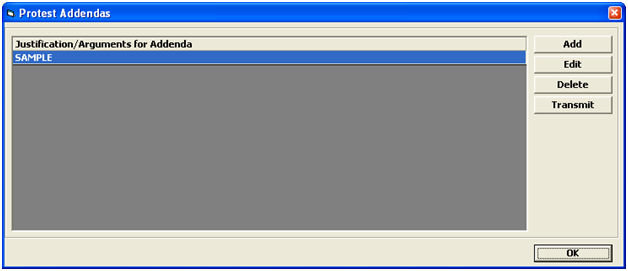
Click Advanced, Addendas to open the Protest Addendas Menu
|
Field/Button |
Status |
Description |
|
Add |
Button |
Click to create a new addenda. This will open the Protest Addenda screen. |
|
Edit |
Button |
Click to edit the selected addenda. This will open the selected line item in the Protest Addenda screen. |
|
Delete |
Button |
Click to delete the selected addenda. |
|
Transmit |
Button |
Click to Transmit the selected addenda. |
|
OK |
Button |
Click to return to the Protest Main Screen. |
|
Field/Button |
Status |
Description |
|
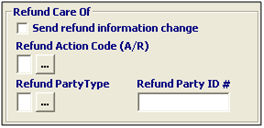
Send Refund Info Change |
Checkbox |
Check this box to indicate that changes to the refund information are being made. |
|
Refund Action Code (A/R) |
Conditional |
Choose the appropriate action code for this refund, or choose from the pick-list by clicking the ellipsis. |
|
Refund Party Type (O/F) |
Conditional |
Choose the refund party type for this refund, or choose from the pick-list by clicking the ellipsis. |
|
Refund Party ID |
Conditional |
Enter the 11-12 digit code identifying the refund party. |

|
Field/Button |
Status |
Description |
|
Send Notify Info Change |
Checkbox |
Check this box to indicate that changes to the notify information are being made. |
|
Notify Action Code (A/R) |
Conditional |
Choose the appropriate action code for this notify change, or choose from the pick-list by clicking the ellipsis. |
|
Filer Code |
Conditional |
Enter the filer code of the substitute party designated to receive the notice of denial. |
|
Port Code |
Conditional |
Enter the processing port of the substitute party designated to receive the notice of denial, or choose from the pick-list by clicking the ellipsis. |
|
Office Code |
Conditional |
Enter the office code of the substitute party designated to receive the notice of denial, or choose from the pick-list by clicking the ellipsis. |
|
Field/Button |
Status |
Description |
|
Add |
Button |
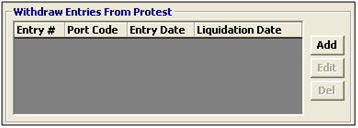
Click to add an entry to be withdrawn from the protest. This will open the Protest Withdraw Entries screen. |
|
Edit |
Button |
Click to edit the selected entry. This will open the selected entry in the Protest Withdraw Entries. |
|
Delete |
Button |
Click to delete the selected entry. |

|
Field/Button |
Status |
Description |
|
Port Code |
Conditional |
Enter the port code for this entry, or choose from the pick-list by clicking the ellipsis. |
|
Filer Code |
Mandatory |
Enter the filer code for this entry. |
|
Entry # |
Mandatory |
Enter the entry number that was withdrawn. |
|
Date of Entry |
Conditional |
Enter the date of the entry, or click the drop-down to select the date from the calendar. |
|
Date of Liquidation |
Conditional |
Enter the date of liquidation for this entry, or click the drop-down to select the date from the calendar. |

|
Field/Button |
Status |
Description |
|
Nature/Justification Arguments for Addenda |
Mandatory |
Enter the statement the alternative claims, additional ground or arguments, set forth distinctly and specifically with respect to each alternative claim, additional ground, or argument. |
|
OK/Cancel |
Buttons |
OK will save the protest addenda. Cancel will cancel and go back to the Protest screen without saving. |
You can click Validation Tool on this screen to check this addenda for errors